Future-Proofing Manufacturing with HMI Programming and End of Arm Tooling
Manufacturing leaders talk a great deal about resilience, but on the plant floor resilience is rarely abstract. It shows up as a cell that can handle a product change without a week of rework, an operator who can recover from a fault without waiting for engineering, and a robot that can switch from one part family to another without sacrificing uptime. Future-proofing is not a slogan in that setting. It is the discipline of making equipment useful for longer, under more conditions, with fewer painful surprises.
Two disciplines sit at the center of that effort more often than they get credit for: HMI programming and end of arm tooling. One governs how people interact with automated systems. The other determines how those systems physically engage with parts. When they are designed well, a line becomes easier to run, easier to maintain, and easier to adapt. When they are treated as afterthoughts, even a high-end robot or CNC cell becomes brittle.
That matters whether the application is machine tending, robotic welding, or broad CNC automation. The same pattern keeps showing up across industries. Companies invest heavily in motion hardware, fixturing, conveyors, and sensors, then discover that the real bottleneck is elsewhere. Operators cannot tell what the machine is trying to do. Maintenance cannot isolate faults fast enough. A gripper works perfectly on one revision of a part but struggles on the next. The system is technically automated, yet operationally inflexible.
The manufacturers that age well are the ones that design for change at the beginning.
The real meaning of future-proofing on the factory floor
Future-proofing does not mean guessing every product variation or buying the most complex platform available. In practice, it means leaving room for reasonable change. A cell should accommodate common part tolerances, likely SKU additions, normal wear, workforce turnover, and software updates without requiring a full rebuild.
That sounds straightforward until schedules tighten. During commissioning, teams often prioritize getting green lights over building durable systems. The pressure is understandable. Production needs parts. Integrators need acceptance. Engineers need issues closed. Under those conditions, HMI screens become cluttered with cryptic diagnostics, and end of arm tooling gets tuned so tightly to one part condition that any deviation causes stoppages.
I have seen both mistakes play out in expensive ways. In one CNC automation project, a tending cell loaded castings into a lathe reliably during runoff, but once full production began, variation from a secondary supplier created intermittent grip failures. The issue was not robot reach or cycle time. It was that the gripper fingers had almost no forgiveness, and the operator screen gave little insight into whether the fault came from part presence, clamp confirmation, or machine-ready status. Engineering spent days tracing a problem that could have been avoided with more tolerant tooling and better HMI fault segmentation.
That kind of lesson tends to stay with a plant.
Why HMI programming determines whether automation scales
An HMI is often treated as a display layer, something that sits on top of the real machine logic. In practice, it is part of the machine. It shapes operator behavior, maintenance response, training time, and even safety outcomes. Poor HMI programming can make a robust system feel chaotic. Strong HMI programming can make a complex system manageable.
The plants that get the most value from automation usually ask a simple question early: who needs to do what on this screen, under pressure, at 2:00 a.m.? That question changes design decisions. A production supervisor wants visibility into throughput, downtime causes, and active alarms. An operator needs clear prompts, permissives, and recovery steps. Maintenance needs I/O status, sequence position, interlock conditions, and fault history. Process engineering may need recipe controls, trend data, and changeover settings. If all of that is crammed into one generic interface, no one gets what they need.
Good HMI programming separates roles without hiding essential information. It uses language people already use on the floor. It avoids alarm floods. It shows machine state in a way that mirrors the actual process sequence. Most importantly, it helps users recover from predictable disruptions without guessing.
In machine tending cells, for example, the HMI should do far more than show automatic and manual mode. It should make part flow visible. Is the infeed clear? Is the robot waiting for machine open? Did the probe fail in the CNC? Is the unload confirmation missing because a part slipped, or because a sensor is dirty? Those distinctions matter. Without them, every stop becomes "the robot faulted," which is rarely true and never useful.
The same principle applies in robotic welding. Weld cells often combine robots, positioners, safety devices, fume extraction, wire feed systems, and quality checks. A flat alarm banner that says "process fault" forces technicians to dig through multiple devices. A well-structured HMI can point directly to wire burnback, gas pressure loss, fixture clamp mismatch, or torch-cleaning timeout. That shortens downtime and reduces the temptation to bypass interlocks just to keep production moving.
What mature HMI programming looks like
Strong HMI programming has a certain feel to it. The screen flow matches the machine sequence. The names make sense. The alarm messages tell users what happened, what condition caused it, and what to check next. Visual hierarchy is clear. Manual functions are grouped logically. Security levels prevent misuse without obstructing legitimate work.
It also respects the realities of maintenance. A seasoned electrician does not need decorative graphics. They need live status, meaningful fault timestamps, and a way to isolate whether a missing condition is caused by a field device, network dropout, logic state, or upstream equipment. If troubleshooting a servo-home issue takes fifteen screen changes, the interface has failed no matter how attractive it looks.
A practical HMI usually includes several elements that pay for themselves quickly:
- Plain-language alarms tied to actual machine states
- Guided recovery screens for common stoppages
- Maintenance views that expose sequence and I/O status
- Recipe and changeover controls with revision discipline
- Event history that helps distinguish chronic faults from one-off disturbances
None of these items are glamorous. All of them matter. On lines with moderate to high labor turnover, guided recovery alone can cut support calls significantly. An operator who sees "Door closed, chuck unclamped, machine in cycle inhibit" can act faster than one staring at "M-code timeout 17."
The other benefit is institutional memory. Plants change people more often than they change equipment. A well-programmed HMI preserves process knowledge inside the system, where it can help the next shift, the new hire, or the maintenance tech who does not specialize in that cell.
End of arm tooling is where flexibility becomes physical
If HMI programming is the voice of the machine, end of arm tooling is its hand. It determines whether automation can deal gracefully with variation or only under ideal conditions.
Too many future-proofing conversations focus on robot payload, reach, or controller features while overlooking the EOAT that actually touches the product. Yet that tooling decides whether parts can be picked from inconsistent nests, whether oily blanks can be handled safely, whether spatter from robotic welding will degrade repeatability, and whether a machine tending system can survive a supplier change.
The difference between a rigid and resilient cell often comes down to simple tooling choices. Finger geometry, compliance, replaceable wear surfaces, sensor placement, vacuum redundancy, cable routing, quick-change couplings, and contamination shielding all influence long-term performance. These are not side details. They are the operating margin of the system.
In CNC automation, grippers regularly face realities that never show up cleanly in CAD. Chips cling to parts. Coolant affects friction. Cast surfaces vary. Burrs appear. Operators load dunnage inconsistently. If the tooling can only handle the nominal condition, uptime will suffer. A better design allows for small positional error, confirms grip where it matters, and isolates wear components so they can be serviced without rebuilding the whole hand.
For robotic welding, end of arm tooling includes more than grippers. Torch mounts, collision devices, dress packs, ream stations, nozzle access, and anti-spatter protection all influence reliability. A beautifully programmed weld path means little if cable strain causes intermittent wire feed issues or if torch alignment drifts after a minor crash. Future-proofing here means accepting that collisions, consumable wear, and part variation will happen, then designing for fast recovery.
The hidden cost of over-optimized tooling
There is a temptation in automation projects to optimize tooling for speed alone. Sometimes that is justified. High-volume, low-mix production can support a purpose-built hand that shaves seconds from the cycle. But many manufacturers no longer operate in that kind of stable environment. Product life cycles shorten. Mix increases. Supply chains introduce variability. A hand designed for one exact geometry may become a liability much sooner than expected.
I have seen a gripper save 1.8 seconds per cycle in validation, only to cost far more later because changing to a related part required custom fingers, new prox brackets, and software edits that cascaded into retesting. By contrast, a slightly slower modular hand, with adjustable stops and sensor mounts, would have handled the new part family with a planned Saturday changeover.
That is the core trade-off. Tight optimization can improve immediate throughput, but modularity and adjustability protect the investment. The right balance depends on production volume, forecast stability, and the economic cost of downtime versus cycle time. There is no universal answer, which is exactly why experienced judgment matters.
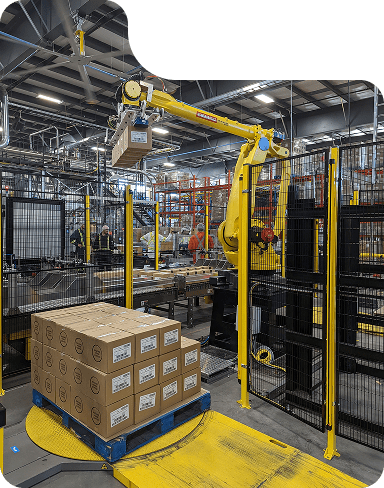
Where HMI programming and EOAT intersect
These two disciplines are strongest when they are developed together rather than in separate silos. Tooling design affects what the HMI needs to display, and HMI design affects how tooling can be diagnosed and maintained.
Consider a machine tending cell with a dual gripper that loads a raw part and unloads a finished part in one machine-open window. That tooling choice can improve cycle efficiency substantially. It also introduces more states to manage: raw-part presence, finished-part confirmation, orientation checks, part-release verification, and sometimes spindle or chuck status dependencies. If the HMI does not reflect those states clearly, troubleshooting becomes difficult. Operators may not know whether the fault lies in the incoming part, the finished-part pickup, or the machine handshake.
Now consider a welding application with quick-change tooling for multiple fixtures. Mechanically, that supports product mix. But unless the HMI handles recipe selection, tool identification, clamp verification, and process lockouts correctly, the flexibility becomes dangerous. The cell may accept a mismatch that produces scrap or causes a crash. Good software turns a flexible mechanical system into a controlled process. Good tooling gives the software something dependable to manage.
This is where many retrofit projects stumble. A plant adds a more capable gripper or introduces changeable tooling, but the HMI remains rooted in the assumptions of the old cell. Screens and alarms no longer match physical reality. People lose trust in the interface. Soon, they rely on tribal knowledge rather than the system itself, which defeats much of the value of automation.
Designing for operators, not just engineers
One of the surest signs of future-proof thinking is respect for the people who run the equipment https://telegra.ph/Industrial-Automation-Canada-Best-Practices-for-Smarter-Plant-Operations-09-26-3 every day. Operators notice things early. They hear an air leak before maintenance logs it. They know which jaws start slipping when coolant concentration changes. They know whether a fault clears cleanly or returns twice per shift. HMI programming and end of arm tooling should capture that practical knowledge, not ignore it.
During development, it helps to watch how operators interact with similar equipment. Do they wear gloves that make small touch targets frustrating? Do they use local jargon for stations and part features that should appear on the screen? Are they likely to clean a sensor face if the HMI tells them exactly where it is, or will a vague message trigger a maintenance call instead? Small design choices here have large consequences over years of use.
The same is true for tooling serviceability. If changing a worn pad requires disassembling half the wrist, it will not get changed promptly. If sensor indicators are hidden, diagnosis slows down. If finger tips are custom-machined with long lead times, a minor crash can idle a line. Future-proofing often looks less like advanced technology and more like thoughtful maintainability.
What to ask before freezing the design
Before a team locks in an automation concept, a few questions reveal whether the system is being built for short-term acceptance or long-term usefulness.
- What part variation is expected, and what variation is merely hoped away?
- Can a new operator recover the five most common faults without engineering support?
- Which tooling components will wear first, and how quickly can they be replaced?
- If a new SKU appears next year, what changes are required in both tooling and HMI?
- Does the fault history help the plant improve, or only document that it stopped?
These questions force honest conversations. They expose whether the design has enough sensing to distinguish real conditions, whether the HMI logic mirrors the process, and whether the end of arm tooling has practical adjustment range. They also shift the team away from "it works" toward "it keeps working."
The retrofit advantage many plants overlook
Not every future-proofing effort starts with a greenfield line. In fact, some of the best returns come from retrofits. An older robot cell with mechanically sound hardware can gain years of productive life through updated HMI programming and redesigned EOAT.
Retrofitting the interface often delivers immediate value because existing machines usually accumulate workarounds over time. Alarm texts become cryptic. Temporary screens become permanent. Product additions create confusing menu paths. Cleaning that up can reduce downtime without touching the main process. Maintenance teams often feel the impact within weeks.
Tooling retrofits are equally powerful when they address a known pain point. A machine tending gripper that suffers from chip buildup may benefit from revised finger relief, better blowoff, or a more tolerant clamp geometry. A welding cell plagued by torch crashes may improve through a better collision mount, cable support, and clearer HMI recovery logic. These are not cosmetic changes. They are targeted interventions that make aging assets more adaptable.
The key is to treat retrofit work as a system upgrade, not just a patch. If the hand changes, the screens, alarms, manuals, spare strategy, and training should change with it. Otherwise the plant ends up with better hardware but the same confusion.
Data matters, but context matters more
Modern manufacturing conversations often jump quickly to dashboards and analytics. Those tools can help, but only if the underlying machine states are trustworthy. HMI programming is one of the places where that trust is built. If fault categories are vague, if events are not time-stamped properly, or if recipes are changed without traceability, the resulting data will mislead.
The same applies to tooling feedback. Sensors should confirm conditions that actually matter to the process, not just whatever is easiest to wire. In some applications, confirming gripper open and closed is enough. In others, especially with variable parts or high-value workpieces, part-present verification at a meaningful contact point is worth the added complexity. For robotic welding, tracking collision events, consumable-change prompts, and process interruptions can reveal whether a cell has a training issue, a fixture issue, or a tool-life issue.
Useful data is specific, contextual, and tied to action. Plants do not need more numbers. They need better causes.
Building automation that ages well
There is a practical elegance to equipment that ages well. It does not need constant heroics. It communicates clearly. It tolerates normal variation. It can be repaired without reverse-engineering old decisions. It can absorb a product change without panic.
HMI programming and end of arm tooling are central to that outcome because they sit at the two most fragile points in any automated process: the human interface and the part interface. One manages information under pressure. The other manages contact under variation. Get both right, and the rest of the automation stack performs closer to its promise.
For manufacturers investing in machine tending, robotic welding, or broader CNC automation, this is where some of the best long-term returns are found. Not in abstract claims about the future, but in concrete decisions made during design reviews, risk assessments, and commissioning. Use language operators understand. Design alarms that isolate causes. Build tooling with serviceable wear points. Leave room for part variation. Plan for product mix. Assume people will change and production demands will shift.
That is what future-proofing really looks like on the floor. It is not a bet on perfect foresight. It is a commitment to systems that remain usable, understandable, and adaptable long after startup day.
Sync Robotics Inc. — Business Info (NAP)
Name: Sync Robotics Inc.Address: 2-683 Dease Rd, Kelowna, BC V1X 4A4
Phone: +1-250-753-7161
Website: https://www.syncrobotics.ca/
Email: [email protected]
Sales Email: [email protected]
Hours:
Monday: 8:00 AM – 4:30 PM
Tuesday: 8:00 AM – 4:30 PM
Wednesday: 8:00 AM – 4:30 PM
Thursday: 8:00 AM – 4:30 PM
Friday: 8:00 AM – 4:30 PM
Saturday: Closed
Sunday: Closed
Service Area: Kelowna, British Columbia and across Canada
Open-location code (Plus Code): VHWR+PQ Kelowna, British Columbia
Map/listing URL: https://maps.app.goo.gl/xwtV2wEu8ZuKH3se8
Embed iframe:
Socials (canonical https URLs):
LinkedIn: https://www.linkedin.com/company/syncrobotics/
Instagram: https://www.instagram.com/syncrobotics/
Facebook: https://www.facebook.com/syncrobotics/
https://www.syncrobotics.ca/
Sync Robotics Inc. is an industrial robot and controls integration company based in Kelowna, British Columbia.
The company designs and deploys automation solutions for manufacturing operations across Canada.
Services include industrial robotics integration, controls integration, automation system design, deployment support, and related manufacturing automation solutions.
Sync Robotics Inc. is located at 2-683 Dease Rd, Kelowna, BC V1X 4A4.
To contact Sync Robotics Inc., call +1-250-753-7161 or email [email protected].
For sales inquiries, email [email protected].
Hours listed are Monday to Friday 8:00 AM–4:30 PM, with Saturday and Sunday closed.
For directions and listing details, use the map listing: https://maps.app.goo.gl/xwtV2wEu8ZuKH3se8
Popular Questions About Sync Robotics Inc.
What does Sync Robotics Inc. do?Sync Robotics Inc. designs and deploys industrial robot and controls integration solutions for manufacturing operations.
Where is Sync Robotics Inc. located?
Sync Robotics Inc. is located at 2-683 Dease Rd, Kelowna, BC V1X 4A4.
Does Sync Robotics Inc. serve clients outside Kelowna?
Yes—Sync Robotics Inc. is based in Kelowna, British Columbia and serves clients across Canada.
What are Sync Robotics Inc.’s hours?
Monday–Friday: 8:00 AM–4:30 PM; Saturday and Sunday closed.
How can I contact Sync Robotics Inc.?
Phone: +1-250-753-7161
General Email: [email protected]
Sales Email: [email protected]
Website: https://www.syncrobotics.ca/
Map: https://maps.app.goo.gl/xwtV2wEu8ZuKH3se8
LinkedIn: https://www.linkedin.com/company/syncrobotics/
Instagram: https://www.instagram.com/syncrobotics/
Facebook: https://www.facebook.com/syncrobotics/
Landmarks Near Kelowna, BC
1) Kelowna International Airport2) UBC Okanagan
3) Rutland
4) Orchard Park Shopping Centre
5) Mission Creek Regional Park
6) Downtown Kelowna
7) Waterfront Park